See line status in real time
Output vs. plan, uptime, and defects flow straight from equipment, so the office knows the line's status right now.

WaveWorks MES
WaveWorks MES unifies factory execution in one system, from work orders to materials, processes, quality, and shipping. Output flows in automatically from equipment, and a single LOT traces back from raw material to shipment. ECHO AI builds production plans and analyzes results, and every screen works as is on PC, tablet, and mobile.
Output vs. plan, uptime, and defects flow straight from equipment, so the office knows the line's status right now.
Scan a barcode to log receipts · moves · issues, and equipment values received by LINKER become output records.
Trace back from a single defect to the job, equipment, material, and LOT to find the cause.
Pull inspection certificates and production history instantly to handle customer audits and claims.
Compare today's work orders with output, identify delayed jobs and remaining production, and relay them to the floor.
Read the jobs and processes to perform, and record quantities produced and work done as floor records.
Links inspection values and results to work, tracing the history of a problem batch back to the raw data.
Upload Excel production plans to confirm work orders, and issue required materials by kitting.
LINKER receives production counts and run status from equipment, so output and uptime build up on their own.
Scan the receiving label and the material is received with an incoming inspection request created. Moves between processes and warehouses are logged with one barcode scan.
Register incoming · in-process · outgoing inspection results to print certificates, and catch process shifts early with SPC control charts.
One lot number traces history from raw material to product and from product back to raw material, shown as a diagram.
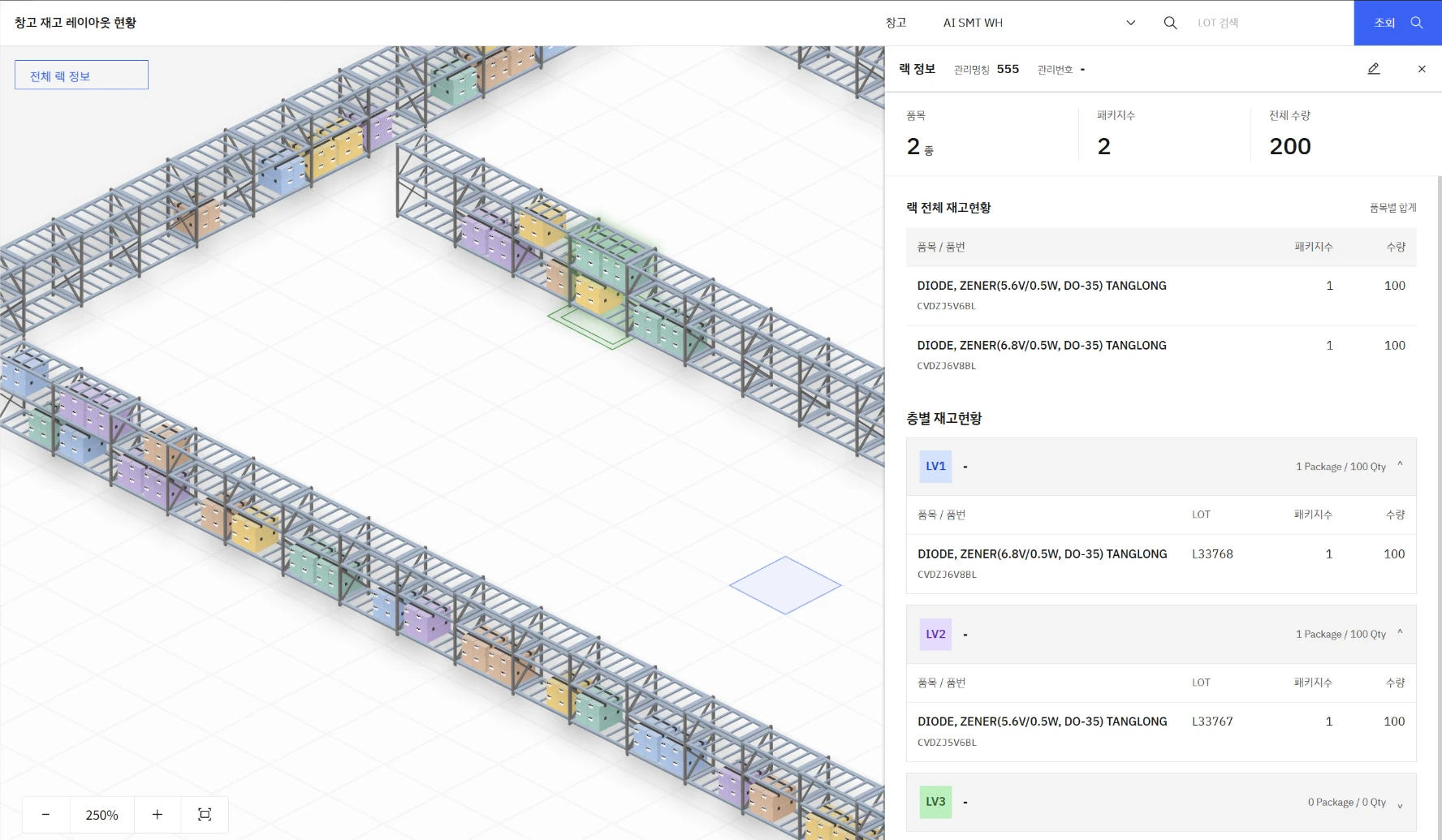
Racks drawn in 3D on the warehouse floor plan show stock by location and LOTs by level at a glance.
Screen 1 · select needed features, your company's MES menu
Apply only the features your company needs. Screens are easy, built for the people who use them, so first-time users learn fast.
Screen 2 · question, draft production plan, material shortage warning, output cause analysis
Ask ECHO AI in plain words and it drafts a production plan from orders, inventory, and equipment availability. On days output drops, it ties together equipment stops, material waits, and defect records to explain the cause. The owner simply reviews and confirms.
Screen 3 · reference LOT, LOTs by level, operator · equipment · recipe
One LOT traces which operator, equipment, and recipe handled the work, from receiving to shipping. When a claim comes in, the root-cause material and process are found immediately.
Screen 4 · warehouse plan, racks, stock by location
See in 3D which materials sit on each rack, on the warehouse floor plan.
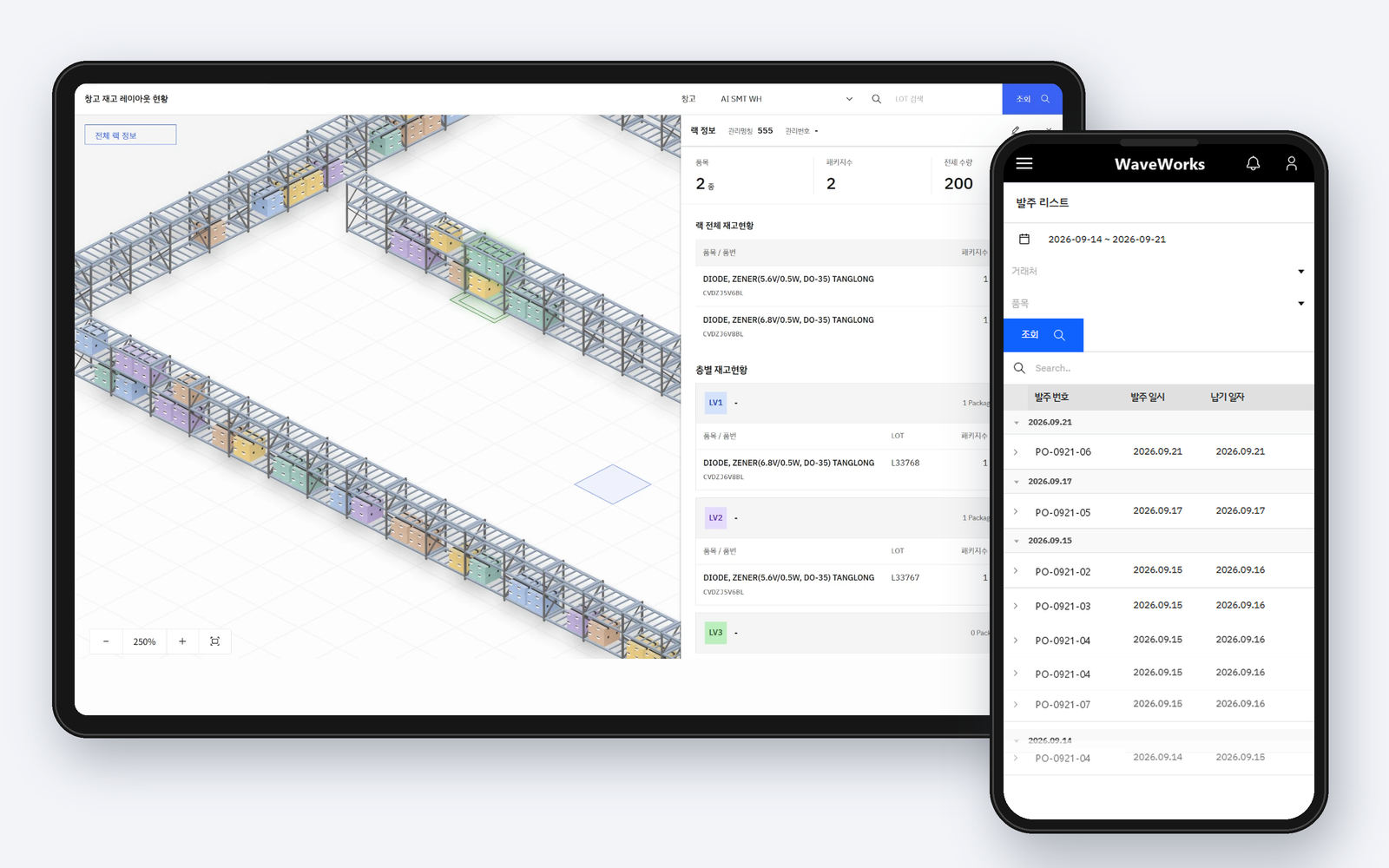
Screen 5 · tablet warehouse layout, phone PO list
Every screen supports tablet and mobile. Check rack inventory on a tablet in the warehouse and look up purchase orders on a phone on the floor. Not a separate app: the same screens and the same data as the PC.
Drafts line-by-line production plans from orders, due dates, inventory, and equipment availability. It flags material shortages in advance; the owner just reviews and confirms.
Ask "Why did Line 2 output drop yesterday?" and it ties together equipment stops, material waits, and defect records to explain the cause.
ECHO Analyze predicts quality from process values and recommends feed and operating conditions before they drift out of spec.
When ECHO Predict catches an anomaly, maintenance time goes into the production plan and work orders are adjusted.
ECHO AI VISION results flow straight into inspection records, and defects stay in LOT history.
When the work is done, the Orchestrator sends a report on production · quality · delivery via WaveWorks Messenger and KakaoTalk.
Add products one at a time as needed, and expand like this.
Deployment model
Configuration and cost vary with scope, user count, and installation environment. Tell us your situation and we will recommend the right approach.
Contact salesDesign collection and operations around floor terminals and equipment networks: on-premises, cloud, or internal network.
Connects ERP orders with production work and receives equipment data from LINKER.
LINKER handles equipment communication such as OPC · PLC · HSMS/SECS. MES receives the items needed for work and links them to output.
Covers work orders, production output, processes, quality, and production history, recording floor activity against work orders.
Receive equipment data through LINKER, and connected items build up in production output automatically.
ERP covers orders, materials, shipping, and delivery. MES records floor work and production results.
Finds the work, process, and inspection data for that batch, preparing an answer from records at the time of production.